Talk - AI Chatbot Mobile App: Your Virtual Confidante
There's a particular kind of relief that comes from talking something through. Not necessarily solving it, just saying it out loud. That's the feeling Talk - AI Chatbot Mobile App captures beautifully—not as a tool, but as a presence. This isn't a chatbot that barks answers or spits out generic advice. It sits with you. It listens. It responds with the kind of warmth you'd expect from a friend who happens to be exceptionally good at conversation.
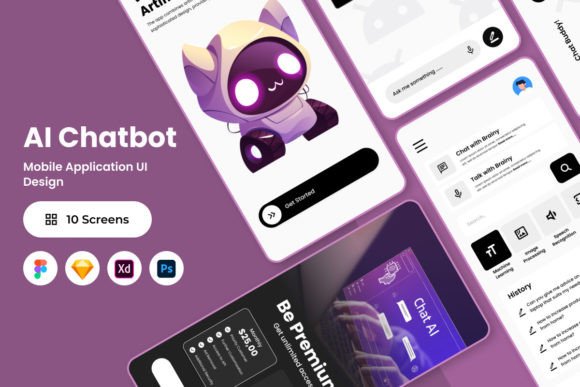
Picture this: it's 11 PM, and you're wrestling with a career decision. Or maybe it's noon, and you want to debate whether pineapple belongs on pizza. Talk handles both with equal grace. The interface feels like settling into a cozy corner booth at your favorite café—familiar, comfortable, and entirely yours. That emotional resonance isn't accidental. It's baked into every design decision, from the soft color palette to the thoughtfully organized screen layouts that make extended conversations feel natural rather than transactional.
Design That Feels Like a Conversation
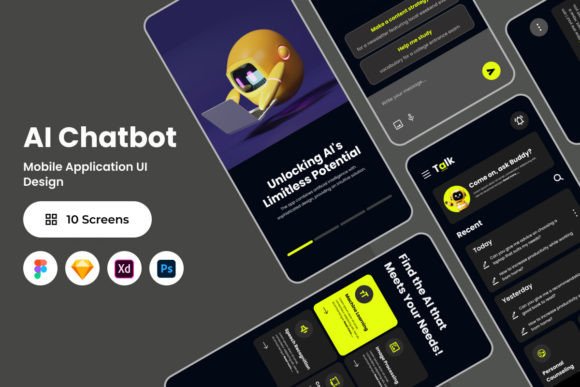
What makes Talk stand out in a crowded market of AI applications is its visual personality. The design language leans into warmth without sacrificing clarity. Typography choices support readability during long exchanges, and the color system maintains consistency across every screen. If you've ever worked on a mobile app design, you know how tricky it is to balance personality with usability. Talk manages it.
The files included are remarkably thorough. You get .fig, .xd, .sketch, and .psd formats—covering virtually every major design platform. Layers are organized cleanly, which sounds like a small thing until you've spent forty minutes hunting through a designer's chaotic file structure. Global text and color styles are already set up, making customization straightforward. Need to adjust the primary accent color to match a client's brand guidelines? Done in minutes. The screen layouts are built to be modified, not just admired from a distance.
For designers working in Figma, Sketch, Adobe XD, or Photoshop, this compatibility matters. You're not forced into a single ecosystem. The open-source fonts eliminate licensing headaches that plague so many design projects. And the overall structure—well-organized layers, logical grouping, clear naming conventions—speaks to someone who actually understands how designers work day to day.
Where This Design Shines Brightest
The Talk - AI Chatbot Mobile App design works across a surprisingly broad range of applications. Obviously, if you're building a conversational AI product, this is your starting point. But the design principles extend further than that.
Mobile app developers looking for a chat interface template will find the layouts immediately useful. The conversation flow, message bubbles, input fields, and response animations are all thoughtfully crafted. Entrepreneurs and startup founders can use these screens to pitch investors or run usability tests before committing development resources. Marketers studying how AI brands present themselves visually will find plenty to analyze here—the balance between approachability and intelligence is instructive.
Even content creators and bloggers working in the AI or wellness space can extract design patterns. The way Talk structures information hierarchy—placing the user's message prominently while giving the AI's response its own visual weight—mirrors best practices in editorial design. The spacing, the typography choices, the way visual rhythm guides your eye through a conversation thread: these are transferable skills worth studying.
Practical Guidance for Working with This Design
Before diving in, spend time with the full file. Don't just open the hero screen and start tweaking colors. Walk through every state—empty conversation, active chat, settings panel, onboarding flow. Understanding the complete system prevents you from breaking something downstream.
Test your modifications at actual device sizes. A color that looks sophisticated on a 27-inch monitor might feel washed out on a phone screen held at arm's length. The design accounts for this, but your changes should too. Pay attention to how the typography hierarchy shifts between headers, body text, and timestamps. These relationships create the visual rhythm that makes extended reading comfortable.
For brand identity projects, consider how the conversational tone of Talk's interface might influence your broader design system. The softness, the human-centered approach, the way it avoids cold clinical aesthetics—these choices communicate something specific about the brand. If your project requires warmth and approachability, there's real value in studying how Talk achieves that without sacrificing professionalism.
Font pairings matter here too. The open-source fonts included work well together, but if you're customizing for a client project, test alternatives carefully. A sans serif font paired with a subtle script font for accent text could reinforce the friendly, conversational personality. Just ensure readability never suffers for the sake of style.
One final note: the images in the preview files are placeholders. They're there to show you the design in context, but they're not included in the download. Plan your own visual assets accordingly, and use the layout structure as your guide rather than treating it as a finished product.
Talk - AI Chatbot Mobile App isn't just a design file. It's a well-considered system that respects both the end user's experience and the designer's workflow. Whether you're building the next great AI companion or simply studying how thoughtful mobile design works, it deserves a place in your toolkit.